How to get started with DJing
Background
When I first started mixing, I googled “How to DJ” where I was welcomed with a disappointing handful of guides. They used terms I had never heard of, explained techniques, skills I didn’t know I needed and seemed to be targeted at someone who already had some foundation. It lead me to consider doing an audio engineering course on Coursera (which is totally not necessary at this stage) while reading How-To Wikis. Frankly, I was all over the place. Coming out of the tech space where (almost) everything is meticulously documented, this was a surprise to me.
I’m writing this not because I know everything there is to know about mixing. Instead, I am writing this in dire urgency because I’m finally starting to understand something about mixing music. In order to write a useful beginner how-to piece, one has to remember every little thing they did not know when they were starting out. So, logically, only a beginner can write a beginner piece with enough empathy to cover everything in agonizing detail. Here I will walk you through the things I have learned (read: stumbled across by luck and overwhelmingly battled through trial and error) between the first day of deciding I wanted to DJ to playing my first gig at The Royale in San Francisco with hundreds of people, 8 months later.
While we’re going into agonizing detail, it is worth explaining what DJing and mixing music actually entails. For this, nothing beats an example.
Production vs. Mixing Software
When you enter this space and begin to familiarize yourself with mixing, you will find that the easiest way to get started is with the help of software. You can definitely mix exclusively off vinyl, avoiding software and its perks, but as a beginner, a software-aided path allows you to learn as much as possible in a short amount of time with limited financial investment.
When considering software, I learned that mixing software will fall into one of two categories: production software and mixing software. Production software usually refers to a tool that you use to make new songs yourself. It includes a selection of drums, piano, bass, and optimizes for short pieces. Mixing software gives you a user interface to evaluate the BPM, key, and measures of two songs and best coerce them together.
Things You Should Ask Your Dj
When planning an event where music and dancing is involved, the DJ is often the most overlooked item. Why? Because most people feel that the DJ is the least important aspect of the whole night. Think again. You could have the most perfect wedding ceremony, the most beautiful church or hall, the best dinner ever, and the most entertaining MC. The thing that most people will remember about your wedding is the reception, because aside from your immediate relatives and best friends, that is what most people look forward to when they are invited to a wedding. The food, the party & music and dancing! The fact is, if the food and/or the DJ is bad, this is what most of your guests will remember.
Do you offer a written contract?
Yes we do. We require a signed contract and 50% retainer to hold the date, the services, the gear and our staff, also so both parties responsible to each other. Armed With Harmony Music Services is responsible to show up and perform, and you are responsible to pay the remaining 50% balance along with full event details 2 weeks/14 days before the event. All retainers are Non refundable/non transferable.
May we meet with you in person before we sign a contract?
We highly recommend it and offer a consultation; this way we will have a mutual understanding as to how the night should run. We prefer face-to-face consultations, but we will happily accommodate those who desire a skype/facetime, phone or e-mail consultation.
Who will be the DJ at our wedding?
Armed With Harmony Music Services has 20 highly qualified djs that can play all types of music and all types of functions; Please refer to our Dj Roster on our website. The dj for your event will be chosen based on many factors including: your music style, your preferences and our availabilities. The earlier you book, the better chance of getting the dj you want.
How long will you hold our date for us?
We only hold dates with a signed contract and 50% retainer. If you happen to have a death in the family get pregnant or for reasons out of your control, and want to push your event date, we will hold it for 1 year from your original wedding/event date.
What Exactly Do DJs Do Live?
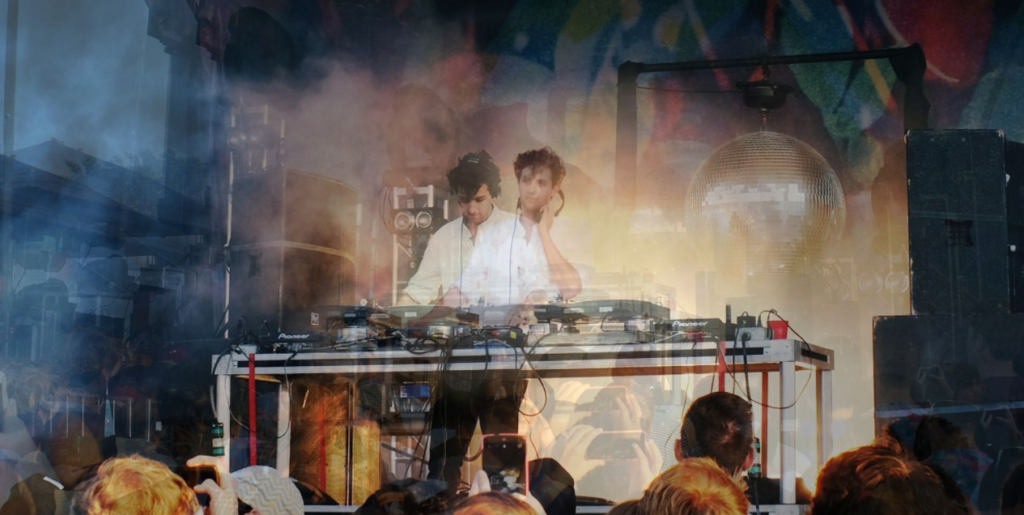
No one knows exactly what DJs do in their console. You see them move their hands. You see them contort their faces in weird ways while moving their hands. But those are mere byproducts of the actual thing they do. But what exactly is that thing? Are they simply pushing buttons? Frying pancakes? Stirring soup? Who knows? It’s a mystery to most of us. We were really curious about this, so we reached out to several DJs and experts on the art of deejaying to find out what exactly DJs do when they play live.
DJing According to DJs
“The number one thing they do is entertain! To be an effective DJ the most crucial element is to know how to engage an audience by mixing one track into the next. This is done by matching BPMs (beats per minute). There are additional things that you may see a DJ do while performing live. When you see them twisting knobs between songs, they are adjusting their EQ (sound level/quality). They scratch records if they perform using vinyl. Some DJs also add visual effects that they control themselves from the DJ booth or audio effects that they add for fun to the songs they mix. Some also dance while performing (spinning) or have a mic to interact with the crowd. Additionally, some create live mashups of songs.”
“I believe the real question is, “Are you just standing there playing an iTunes playlist or are you actually doing something?” Most DJs are manipulating the songs to blend seamlessly together by changing speed, looping sections, changing EQ and Key. If you are good at your job, it is a constant search for the perfect song to keep pulling your crowd along with you on the music set ride. If you falter, the dance floor clears. Then there are those moments when just the perfect beat hits and the crowd goes wild…that’s why we DJ.”
“As a DJ and a musician for over 20 plus years, I get to hear it from both sides. Musicians tend to think a DJ does nothing more than press some buttons while musicians spend hours and hours each and every day of their lives crafting their musical abilities. Music is medicine. Music is a universal language. It’s also art, and art is subjective. There are DJs and turntablists, and both groups have their respective talents. A turntablist would be much more akin to a musician. As turntablism is very similar, in a way, to being a percussionist. True turntablism skills on the record players, sometimes more than 2, is an art form and something that does require many hours of practice, just like any musician.
But being a DJ these days also has its special talent and merit. I had a friend who was a musical snob. Who only listened to “opera” and “classical” music. He asked me one day, so you just play “other people’s” music. Like that involved no talent whatsoever.
WAYS TO MAKE YOUR LIVE STREAM DJ SET STAND OUT
As coronavirus induced lockdown continues around the world, and clubs are closed for the foreseeable, many DJs are turning to live streaming sets to keep the party going and continue to serve the global dance music community in these difficult times. But with so many live streams, from the low-key, one-cam kitchen and controller soirée, to the full-on production and immersive experience of Dixon’s Transmoderna, there’s a torrent of streamed DJ sets to choose from.
So, how do you get noticed? And how to get people listening to, talking about and sharing your streams? Before you do anything, read our beginners guide to livestreaming from your phone and laptop. We’re going to be talking about some things below that assume you’ve read it. We’re going to be using Open Broadcast System (OBS) for this, which is a free broadcasting software, so download it here if you’re just starting. Once you’ve got the basics sorted, we’ve put together a quick five-step guide to help spark some inspiration, and get your sets looking visually strong and interesting with limited resources and budgets. The music, of course, is up to you.
ADD EXTRA CAMERAS
We know, we know, easier said than done – especially when almost all webcams are sold out around Europe – thanks ZOOM. But adding extra cams really does help in switching up the visual aspect and keeping the streams engaging, standing out from the crowd and maybe giving the audience some extra insight into what you’re actually doing.
If the device is a bit older with a lower res camera, why not give it a novelty name like ‘Mixer Cam’ and add a filter like black or white or something stylised to detract from the lower quality? Or make it picture-in-picture so it’s smaller? There’s always a solution
There’s also the issue of switching between the angles, especially if you’re isolating alone and don’t have any help. Wireless keyboards are a good shout here, and hot cues in OBS will easily let you map number 1 through 5, for example, to different angles and Scenes. Alternatively, if you find yourself and your housemates with plenty of iOS devices, a service called Switcher Studio can create a full-on TV studio using wireless iPhones and an iPad switcher software. It can also load assets, animated text, logos, live on-screen Facebook comments, and even bring in remote guests. It starts at $39 per month and is worth checking out if you want to expand your ‘show’ from just DJing to something more TV-like.
PIECES OF THE BEST BEGINNER DJ GEAR
It starts gradually enough… First, top 40 music becomes even more unbearable than before. Then, your Spotify playlists shed all that normie music you learned from your dad and college girlfriend. You try to get your fix by going to music festivals and surrounding yourself with it, bathing in it — alas! That, too, is not enough. Your hunger for electronic music simply cannot be sated by listening alone. You have transcended (Or perhaps been cursed?)! Now it’s time to shop for your first pieces of DJ equipment.
Read on to discover some of the best beginner DJ gear. Each category is split into a budget-friendly vs higher-end alternative. Whatever the choices, picking one item from each category will create a full package that will carry any DJ through their early years of mixing and producing.
DJ CONTROLLERS
In days of yore, the primary way for DJs to spin their music was by connecting two turntables stacked with vinyls to a central mixer. These days, DJ controllers fuse these independent pieces of gear into a single board and interface directly with a computer and software.
The Pioneer DDJ-200 is the only exclusively-beginner item on this list. It is a compact controller aimed at those who are taking their first half-step into the world of DJing. The DDJ-200 has a plethora of tutorial features, and it interfaces directly with many streaming platforms, which means no local music is necessary to mix a set.
The DDJ-SB3 and DDJ-400 are two of the most fully fledged, beginner-friendly DJ controllers. They offer all of the basic functions necessary to DJ at the professional level and quite a few bonus features as well (pre-programmed scratching, fading, etc.). Both controllers are very similar, with the biggest difference being their use of Serato versus rekordbox software